
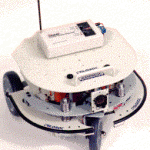
The Trilobot mobile robot combines the latest in microcontroller and sensor technology with a strong, lightweight frame to create an affordable, rugged platform. Perfect for research in artificial intelligence, artificial life, autonomous navigation, robotics technology, and even maze competition. High-level commands can be sent to the Trilobot’s on-board controller from a PC using a serial (RS-232) interface. The user can place a laptop computer on the upper deck of the robot or communicate via wireless data links. The user can then control the Trilobot using any terminal program or by using popular programming languages such as C, BASIC or Pascal. Controllers can be daisy chained together for unlimited expansion capability. The simple two-letter command structure makes programming quick and efficient.
The Trilobot frame is made entirely from strong, lightweight aircraft aluminum. The front drive wheel and the two rear idler wheels each have independent suspension to reduce vibration. The front, center wheel is driven by a strong DC motor at speeds up to 15 inches per second. Steering is performed by a stepper motor which can rotate the front wheel up to 90 degrees left or right from center. The upper deck has an array of mounting holes for accessories and is hinged to allow access to the battery, controller and other components. Multiple decks can be added for additional expansion. We offer wireless data links for use with the Trilobot.
Specifications
Mechanical: 1/8 inch aircraft aluminum, CNC punched frame components. Vibration resistant fasteners. Three-wheel independent suspension. Front wheel drive and steering with encoder, two rear idler wheels. 14″ wide, 14″ long, 10″ tall. 15 lbs. 20 lb. payload capacity. Hinged upper deck for access to electronics.
Power: 12 volt, 7 amp hour sealed lead-acid. 4 to 24 hour run time depending on activity. Accessory jack to power a laptop computer or radio modem. Wall mount charger included. Manual on/off/charge switch.
Drive motor control: 12 volt DC motor. Forward and reverse directions. PWM speed control, 0-100% voltage in 10% increments. Maximum speed is 15″/sec. Desired travel distance from 1 to 9,999 inches in 1 inch increments. Auto pilot function stops motor when bumper switches activated. Sensors can be read while drive motor is on.
Steering control: 4-phase stepper motor with gear reducer and home switch. Positions 90 degrees left and right from straight in 1 degree increments.
Ultrasonic ranging: Measures the distance to the nearest object for collision avoidance and to aid navigation. Detects objects from 1 to 20 feet away in 1 inch increments.
Electronic compass: Detects heading using solid-state magnetic sensor – N, S, E, W, NE, NW, SE, SW.
Temperature sensor: Reads ambient temperatures from 0 to 130 degrees fahrenheit.
Light level sensor: Senses light level. 0-255, 0=dark, 255=bright.
Tilt sensor: Detects tilting of the robot to aid navagition. Detectable conditions include flat, front, back, left, right.
Battery status: Detects voltage of battery.
Bumper switches: Front and rear low-force, mechanical lever switches for collision detection.
Wheel travel encoder: Measures drive wheel travel from 0 to 9,999 inches in 1 inch increments.
Beeper: Used to send audio signals.
Auxiliary output signal: Control an accessory such as headlights or a vacuum cleaner. 12 volt, 1 amp capacity.
Auxiliary input signals: Used to read a digital input such as a moisture sensor, smoke alarm, sound level, etc.
Trilobot Component Layout
Programming the Trilobot
The Trilobot is designed to be programmed by you. We don’t supply software to perform specific tasks such as navigation, etc. It’s up to you to program the Trilobot from the computer platform of your choice.
The Trilobot is programmed using simple ASCII text commands and parameters. Each command consists of a 2-letter controller ID and a 2-letter command followed by parameters. The controller ID allows multiple controllers to be daisy chained together on the same serial cable without interference. The main controller ID is !1. Each command will either return an ‘A’ indicating ‘accomplished’ or will return the desired information. There are many commands available to the programmer. The 3 most frequently used are explained below.